This page builds one map from start to finish: the cafés of Eindhoven, the Day 1 Points map of the #30DayMapChallenge. It is deliberately plain. The point is to see every step once, in order, so that when something goes wrong later you know which step to look at.
Step 1: Data
A map starts with a file that has geometry in it. The most common formats are:
| Format | Extension | Notes |
|---|---|---|
| GeoJSON | .geojson | Plain text, one file, always lon/lat (EPSG:4326). Good for small data and the web. |
| GeoPackage | .gpkg | One file, any CRS, many layers, fast. The best default for your own data. |
| Shapefile | .shp + .shx + .dbf + .prj | Old and everywhere. Several files that must travel together; column names cut to 10 characters. |
| CSV with coordinates | .csv | Not spatial until you tell the software which columns are x and y, and in which CRS. |
Reading any of them gives you a GeoDataFrame (Python) or an sf data frame (R): a normal
table with one extra column, geometry, that holds a shape for each row.
import geopandas as gpd
import matplotlib.pyplot as plt

cafes = gpd.read_file("data/eindhoven_cafes.geojson")
boundary = gpd.read_file("data/eindhoven_boundary.geojson")

print(len(cafes), "cafés")
cafes[["name", "outdoor_seating", "geometry"]].head()
91 cafés
The geometry column holds POINT (longitude latitude). Longitude comes first, because it is the
x axis. This trips up almost everyone at least once: people say “lat, lon”, but software says
“x, y”.
library(sf)
library(ggplot2)

cafes    <- st_read("data/eindhoven_cafes.geojson")
boundary <- st_read("data/eindhoven_boundary.geojson")

nrow(cafes)
head(cafes[, c("name", "outdoor_seating")])
Step 2: Projection
Every spatial dataset has a coordinate reference system (CRS) that says what its numbers mean. GeoJSON is always in EPSG:4326: degrees of longitude and latitude on a globe. Before you plot, measure or buffer anything in the Netherlands, convert it to EPSG:28992 (Amersfoort / RD New), the Dutch national grid, which is in metres on a flat plane.
print("Before:", cafes.crs)

cafes = cafes.to_crs(epsg=28992)
boundary = boundary.to_crs(epsg=28992)

print("After: ", cafes.crs)
print("Eindhoven covers", round(boundary.area.iloc[0] / 1e6, 1), "km²")
Before: EPSG:4326
After: EPSG:28992
Eindhoven covers 89.4 km²
That area is only meaningful because the data is now in metres. Computed in EPSG:4326 the answer would be in “square degrees”, which is not a unit of anything. Projections explains why, and what to use outside the Netherlands.
st_crs(cafes)$input              # "WGS 84"

cafes    <- st_transform(cafes, 28992)
boundary <- st_transform(boundary, 28992)

st_area(boundary) / 1e6          # in km², with units attached
Step 3: Geometry
This is where the analysis happens: filtering rows, measuring, combining layers. For a Day 1 map there is little to do, but it is worth asking one question of the data so the map says something. Here: how many cafés have outdoor seating?
cafes["terrace"] = cafes["outdoor_seating"].eq("yes")
cafes["terrace"].value_counts()
terrace
False 67
True 24
Name: count, dtype: int64Most cafés have no outdoor_seating tag at all. That does not mean they have no terrace: it means
no volunteer has recorded it. A missing value in OpenStreetMap is unknown, not no, and the map
should say so. Vector data covers the operations you will use most: buffers,
distances, spatial joins and dissolves.
Step 4: Styling
Draw the layers from the bottom up: context first, data on top. Then remove what does not help the reader (axis ticks in metres from Amersfoort help nobody) and add what does: a title, and a credit line.
fig, ax = plt.subplots(figsize=(7, 7))

boundary.plot(ax=ax, facecolor="0.95", edgecolor="0.4", linewidth=0.6)
cafes[~cafes["terrace"]].plot(ax=ax, color="0.55", markersize=12, label="Terrace unknown or none")
cafes[cafes["terrace"]].plot(ax=ax, color="#c8102e", markersize=22, label="Terrace (outdoor_seating=yes)")

ax.set_axis_off()
ax.legend(loc="lower right", frameon=False, fontsize=9)
ax.set_title("Where to sit outside with a coffee in Eindhoven", loc="left",
             fontsize=14, fontweight="bold")
ax.annotate("Data: © OpenStreetMap contributors (ODbL), downloaded 2026-10-21  |  EPSG:28992",
            xy=(0, 0), xycoords="axes fraction", xytext=(0, -12), textcoords="offset points",
            fontsize=7, color="0.4")

plt.show()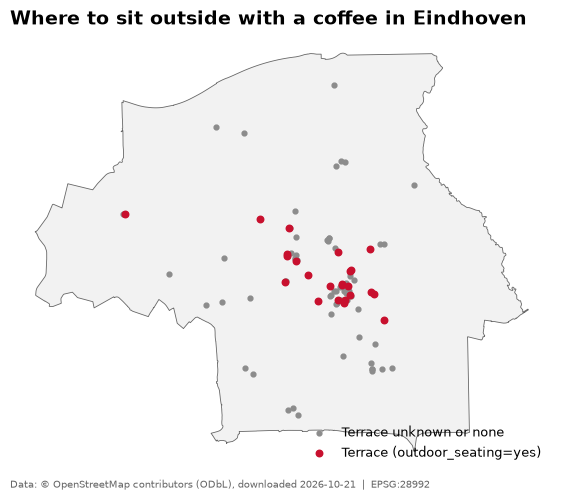
Three choices are doing most of the work here. The boundary is light grey, so it reads as background. The cafés with a terrace are larger and in a strong colour, so they read first. And the title states what the map is for, rather than just naming the dataset. Map design goes through these choices properly.
cafes$terrace <- !is.na(cafes$outdoor_seating) & cafes$outdoor_seating == "yes"

p <- ggplot() +
  geom_sf(data = boundary, fill = "grey95", colour = "grey40", linewidth = 0.4) +
  geom_sf(data = cafes[!cafes$terrace, ], colour = "grey55", size = 1.2) +
  geom_sf(data = cafes[cafes$terrace, ],  colour = "#c8102e", size = 2.2) +
  coord_sf(datum = NA) +
  labs(
    title   = "Where to sit outside with a coffee in Eindhoven",
    caption = "Data: © OpenStreetMap contributors (ODbL), downloaded 2026-10-21  |  EPSG:28992"
  ) +
  theme_void(base_size = 11) +
  theme(plot.title = element_text(face = "bold"), plot.background = element_rect(fill = "white", colour = NA))
coord_sf(datum = NA) removes the graticule lines; theme_void() removes the axes. Writing the
© as © keeps the script working on machines with a different text encoding.
Step 5: Export
A map that only exists in your plotting window is not finished. Save it at a known size and resolution, with a white background so it does not turn transparent on social media.
fig.savefig("map.png", dpi=200, bbox_inches="tight", facecolor="white")ggsave("map.png", p, width = 7, height = 7, dpi = 200, bg = "white")A 7 × 7 inch figure at 200 DPI is 1400 × 1400 pixels: sharp on a phone, small enough to post. For
print use 300 DPI, and for a poster set the real size in centimetres and keep 300 DPI. Save a
vector copy too (map.pdf or map.svg) if you might want to edit it later in Inkscape or
Illustrator.
The whole script
Put together, without the explanations. This is the shape every map script in this section has, and it runs top to bottom in a fresh session.
import geopandas as gpd
import matplotlib.pyplot as plt

# 1. Data
cafes = gpd.read_file("data/eindhoven_cafes.geojson")
boundary = gpd.read_file("data/eindhoven_boundary.geojson")

# 2. Projection
cafes, boundary = cafes.to_crs(28992), boundary.to_crs(28992)

# 3. Geometry
cafes["terrace"] = cafes["outdoor_seating"].eq("yes")

# 4. Styling
fig, ax = plt.subplots(figsize=(7, 7))
boundary.plot(ax=ax, facecolor="0.95", edgecolor="0.4", linewidth=0.6)
cafes[~cafes["terrace"]].plot(ax=ax, color="0.55", markersize=12)
cafes[cafes["terrace"]].plot(ax=ax, color="#c8102e", markersize=22)
ax.set_axis_off()
ax.set_title("Where to sit outside with a coffee in Eindhoven", loc="left", fontweight="bold")

# 5. Export
fig.savefig("map.png", dpi=200, bbox_inches="tight", facecolor="white")