Points on a background take you a long way, but several challenge days ask for something else: hexagons (Day 20), rasters (Day 29), OpenStreetMap basemaps (Day 21), light and dark (Day 17). This page covers the techniques behind them.
import geopandas as gpd
import matplotlib.pyplot as plt
import numpy as np
from shapely.geometry import Polygon

cafes = gpd.read_file("data/eindhoven_cafes.geojson").to_crs(28992)
boundary = gpd.read_file("data/eindhoven_boundary.geojson").to_crs(28992)
Hexagon grids
Administrative areas come in every size, which makes them hard to compare (see counts or rates). A grid of equal cells removes that problem, and hexagons are the favourite shape: every neighbour is the same distance away, and the map looks less blocky than squares.
def hex_grid(bounds, size):
    """Flat-topped hexagons with the given centre-to-corner size, covering bounds (in metres)."""
    x0, y0, x1, y1 = bounds
    w, h = 1.5 * size, np.sqrt(3) * size
    corners = [(size * np.cos(a), size * np.sin(a)) for a in np.radians(range(0, 360, 60))]
    hexes = []
    for i, x in enumerate(np.arange(x0, x1 + w, w)):
        offset = h / 2 if i % 2 else 0
        for y in np.arange(y0 - offset, y1 + h, h):
            hexes.append(Polygon([(x + dx, y + dy) for dx, dy in corners]))
    return gpd.GeoDataFrame(geometry=hexes, crs=28992)

hexes = hex_grid(boundary.total_bounds, size=350)
hexes = hexes[hexes.intersects(boundary.union_all())].reset_index(drop=True)

hits = gpd.sjoin(cafes, hexes, predicate="within").groupby("index_right").size()
hexes["cafes"] = hits.reindex(hexes.index, fill_value=0)

fig, ax = plt.subplots(figsize=(7, 7))
hexes.plot(ax=ax, color="0.93", edgecolor="white", linewidth=0.5)
hexes[hexes["cafes"] > 0].plot(ax=ax, column="cafes", cmap="magma_r", edgecolor="white",
                               linewidth=0.5, legend=True,
                               legend_kwds={"label": "cafés per hexagon", "shrink": 0.5})
boundary.boundary.plot(ax=ax, color="0.3", linewidth=0.8)
ax.set_axis_off()
ax.set_title("Day 20: Hexagons. Cafés per 350 m hexagon", loc="left", fontweight="bold")
plt.show()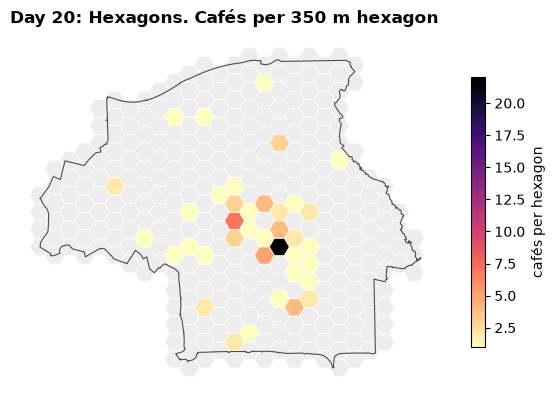
Drawing the empty hexagons in light grey keeps the shape of the city visible and shows that “no café” is a value, not missing data.
Rasters
A raster is a grid of pixels, each with a value: elevation, temperature, land cover, a satellite band. Where vector data says there is a thing here, raster data says here is how much of something there is, everywhere. Every raster has a CRS, a pixel size (its resolution) and an extent, just as vector data has a CRS.
A raster from points: density
You can turn points into a raster by estimating their density at every pixel: a kernel density estimate (KDE). Each café spreads a small bell-shaped hill of “café-ness” around it, and the hills are added up. This uses only NumPy, so it is a good way to see what a raster really is: an array of numbers with coordinates attached.
pixel = 50                       # metres
bandwidth = 300                  # how far each café's influence spreads, in metres
x0, y0, x1, y1 = boundary.total_bounds
xs = np.arange(x0, x1, pixel) + pixel / 2
ys = np.arange(y0, y1, pixel) + pixel / 2
gx, gy = np.meshgrid(xs, ys)

density = np.zeros_like(gx)
for p in cafes.geometry:
    density += np.exp(-((gx - p.x) ** 2 + (gy - p.y) ** 2) / (2 * bandwidth ** 2))
density /= 2 * np.pi * bandwidth ** 2 / 1e6        # cafés per km²

print("raster shape:", density.shape, "pixels of", pixel, "m")

fig, ax = plt.subplots(figsize=(7, 7))
img = ax.imshow(density, origin="lower", extent=(x0, x1, y0, y1), cmap="inferno")
boundary.boundary.plot(ax=ax, color="white", linewidth=0.6, alpha=0.7)
fig.colorbar(img, ax=ax, shrink=0.5, label="cafés per km²")
ax.set_axis_off()
ax.set_title("Day 17: Light & dark. Café density, 300 m kernel", loc="left", fontweight="bold")
plt.show()
raster shape: (216, 268) pixels of 50 m
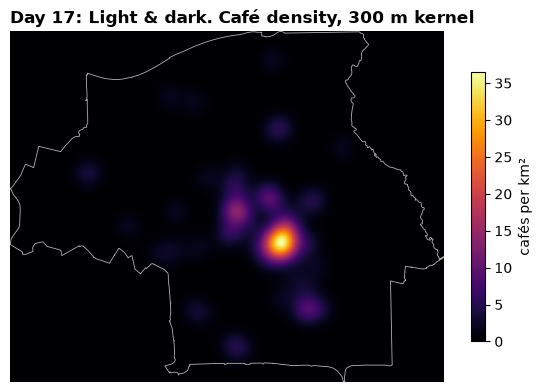
Two details are worth noticing. origin="lower" puts row 0 at the bottom, because y grows
northwards; leave it out and the map is upside down. And extent is what gives the array its
coordinates, so the boundary lines up with it. The bandwidth is a choice, like the class edges of
a choropleth: try 150 m and 600 m and the story changes. Say which you used.
For real analysis, use scipy.stats.gaussian_kde or sklearn.neighbors.KernelDensity in Python,
or spatstat in R, which also handle edge effects properly.
Elevation: AHN
The Netherlands has one of the best elevation datasets in the world, the AHN, at 0.5 m. Download
a tile as shown in Finding data, then read and plot it with
rasterio (Python) or terra (R).
# pip install rasterio
import rasterio
from rasterio.plot import show

with rasterio.open("ahn_dtm.tif") as src:
    print(src.crs, src.res, src.bounds)     # EPSG:28992, (0.5, 0.5), ...
    dtm = src.read(1, masked=True)          # masked: nodata pixels (water, buildings) hidden

    fig, ax = plt.subplots(figsize=(7, 7))
    show(dtm, transform=src.transform, ax=ax, cmap="terrain")
A hillshade makes small differences in height visible, and is the classic look for Day 29:
from matplotlib.colors import LightSource

shade = LightSource(azdeg=315, altdeg=45).hillshade(dtm.filled(np.nan), vert_exag=5, dx=0.5, dy=0.5)
ax.imshow(shade, cmap="gray", extent=(src.bounds.left, src.bounds.right,
                                      src.bounds.bottom, src.bounds.top))
# install.packages("terra")
library(terra)
dtm <- rast("ahn_dtm.tif")
crs(dtm, describe = TRUE)$code # "28992"
slope <- terrain(dtm, "slope", unit = "radians")
aspect <- terrain(dtm, "aspect", unit = "radians")
plot(shade(slope, aspect, angle = 45, direction = 315), col = grey(0:100 / 100), legend = FALSE)Eindhoven is flat, so use a strong vertical exaggeration or look for the river Dommel valley. The
dsm_05m coverage includes buildings and trees: subtract the DTM from it and you get the height
of everything standing on the ground, a striking map for almost any city.
Basemaps
A basemap is a background of streets, buildings or terrain drawn from web map tiles. It helps readers orient themselves, but it also competes with your data. Use a muted one (such as CartoDB Positron), and only when the reader needs to know where things are.
# pip install contextily
import contextily as cx

ax = cafes.plot(figsize=(7, 7), color="#c8102e", markersize=12)
cx.add_basemap(ax, crs=cafes.crs, source=cx.providers.CartoDB.Positron)
ax.set_axis_off()
contextily downloads tiles in Web Mercator and reprojects them to your data’s CRS, so you can
keep the map in EPSG:28992.
# install.packages(c("maptiles", "tidyterra"))
library(maptiles); library(tidyterra)

tiles <- get_tiles(boundary, provider = "CartoDB.Positron", crop = TRUE)
ggplot() + geom_spatraster_rgb(data = tiles) + geom_sf(data = cafes, colour = "#c8102e")
Tiles have their own licences and attribution requirements: OSM tiles need “© OpenStreetMap contributors”, CartoDB tiles also need “© CARTO”. Do not hammer the public OSM tile server with many requests; it is run by volunteers, and its usage policy forbids bulk downloading.
Interactive web maps
A static PNG is right for the challenge, but an interactive map is often better for exploring your own data. Both libraries below draw on an OpenStreetMap basemap and use Web Mercator underneath, which is fine for looking but not for measuring.
# pip install folium
m = cafes.explore(column="outdoor_seating", tooltip="name", tiles="CartoDB positron")
m.save("cafes.html")        # open it in a browser, or display m in a notebook
library(tmap)
tmap_mode("view")
tm_shape(cafes) + tm_dots(fill = "outdoor_seating", popup.vars = "name")tmap_mode("plot") switches the same code back to a static map, which makes tmap a good choice
if you want both.
<div id="map" style="height: 600px"></div>
<script>
  const map = L.map("map").setView([51.44, 5.48], 13);
  L.tileLayer("https://tile.openstreetmap.org/{z}/{x}/{y}.png", {
    attribution: "© OpenStreetMap contributors",
  }).addTo(map);
  fetch("eindhoven_cafes.geojson").then((r) => r.json()).then((d) => L.geoJSON(d).addTo(map));
</script>
With Leaflet loaded on the page. GeoJSON goes in unchanged, because web maps expect lon/lat.
QGIS
QGIS is free, runs everywhere, and is the right tool when you would rather click than code, or want to polish a map made in code.
Drag the GeoJSON files into the window.
Set the project CRS to EPSG:28992, bottom right.
Layer Properties → Symbology for colours, sizes and classification (the same equal interval, quantile and natural breaks choices as in Map design).
Vector → Research Tools → Create Grid makes square or hexagon grids; Vector → Analysis Tools → Count Points in Polygon fills them.
Browser → XYZ Tiles → OpenStreetMap adds a basemap.
Project → New Print Layout adds a title, legend, scale bar and credits, then Export as Image.
Days that suit QGIS especially well: 3 Polygons, 20 Hexagons, 29 Raster.