A plot shows data. A map answers a question about a place. The difference is mostly a dozen small decisions about what the reader sees first, what colours mean, and what text is on the image. None of them need design training, and together they are the difference between a map people scroll past and one they stop at.
import geopandas as gpd
import matplotlib.pyplot as plt
import numpy as np
from shapely.geometry import box

cafes = gpd.read_file("data/eindhoven_cafes.geojson").to_crs(28992)
boundary = gpd.read_file("data/eindhoven_boundary.geojson").to_crs(28992)
Start from the question
Before choosing a colour, write the title as a statement or a question: “Eindhoven’s cafés are packed into one square kilometre”, rather than “Cafés in Eindhoven”. Once you know what the map is for, most of the other decisions make themselves: what to emphasise, what to leave out, and which comparison the colours should make easy.
Visual hierarchy
The reader’s eye goes to the strongest contrast first. Use that on purpose:
Data in front, context behind. Boundaries, water and streets in light greys; the thing the map is about in a saturated colour.
One accent colour. If everything is bright, nothing is.
Remove what does not help. Axis ticks, a frame, gridlines in metres: almost never useful on a map.
Size encodes importance. Larger, darker symbols for the features that answer the question.
Anatomy of a map shows these choices on the Day 1 map.
Colour
Choose the palette by the kind of data, not by taste:
| Data | Palette type | Good choices |
|---|---|---|
| Ordered, low to high (density, income) | sequential, one hue light to dark | viridis, cividis, Blues, YlOrRd |
| Above or below a meaningful middle (change, difference from average) | diverging, two hues through a neutral | RdBu, PuOr, BrBG |
| Categories with no order (land use, cuisine) | qualitative, distinct hues, similar lightness | Set2, tab10, Okabe-Ito |
Three rules that prevent most problems:
Light means less. On a white background, readers assume darker is more. Do not fight it.
Avoid rainbow palettes (
jet,rainbow) for ordered data. They create edges in the data that are not there, and about one in twelve men cannot tell their reds from their greens. Theviridisfamily was designed to avoid both.Check in greyscale. If the map still reads when printed in black and white, the palette is doing its job. Coblis simulates colour-blindness on any image.
ColorBrewer is the standard tool for picking map palettes, with colour-blind-safe and print-safe filters.
Classification: the choice that changes the story
A choropleth (areas coloured by a value) has to turn numbers into colours. You can use a continuous scale, or group the values into classes. The way you group them can make the same data tell opposite stories. To show it, here is a 500 m grid over Eindhoven with the number of cafés in each square.
size = 500
x0, y0, x1, y1 = boundary.total_bounds
cells = [box(x, y, x + size, y + size)
         for x in np.arange(x0, x1, size) for y in np.arange(y0, y1, size)]
grid = gpd.GeoDataFrame(geometry=cells, crs=28992)
grid = grid[grid.intersects(boundary.union_all())].reset_index(drop=True)

counts = gpd.sjoin(cafes, grid, predicate="within").groupby("index_right").size()
grid["cafes"] = counts.reindex(grid.index, fill_value=0)

grid["cafes"].describe()[["count", "mean", "50%", "max"]]
count 416.00000
mean 0.21875
50% 0.00000
max 18.00000
Name: cafes, dtype: float64Most squares have no café; a few in the centre have many. That kind of skewed distribution is normal for anything urban, and it is exactly where the classification choice matters.
schemes = {
    "Equal interval": dict(scheme="equal_interval", k=5),
    "Quantiles": dict(scheme="quantiles", k=5),
    "Natural breaks (Fisher–Jenks)": dict(scheme="fisher_jenks", k=5),
}
with_cafes = grid[grid["cafes"] > 0]

fig, axes = plt.subplots(1, 3, figsize=(13, 4.8))
for ax, (name, kw) in zip(axes, schemes.items()):
    boundary.plot(ax=ax, facecolor="0.96", edgecolor="0.6", linewidth=0.5)
    with_cafes.plot(ax=ax, column="cafes", cmap="YlOrRd", edgecolor="white", linewidth=0.3,
                    legend=True, legend_kwds={"loc": "upper left", "bbox_to_anchor": (0.82, 0.45),
                                              "fontsize": 7, "frameon": False, "fmt": "{:.0f}",
                                              "title": "cafés", "title_fontsize": 7}, **kw)
    ax.set_title(name, loc="left", fontsize=10)
    ax.set_axis_off()
plt.show()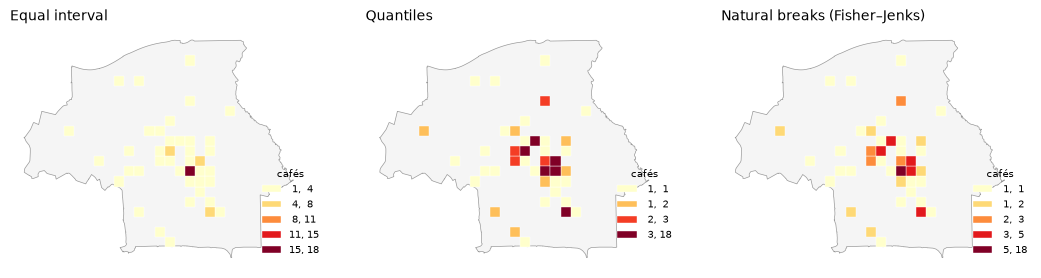
Equal interval splits the range into equal steps. With skewed data almost everything lands in the lowest class and the map shows one hot spot. Honest about the range, poor at showing variation.
Quantiles put the same number of areas in each class. Every colour gets used, so the map looks busy and varied, but squares with very different counts can share a colour, and one café can look like a lot. With this many 1s and 2s the class edges even repeat (
1, 1,1, 2): the method has run out of distinct values to split on.Natural breaks (Fisher–Jenks) look for gaps in the data. Usually the best compromise for exploration, but the class edges are odd numbers that change when the data does.
There is no neutral choice. Pick the one that answers your question honestly, use round numbers
for the class edges when you can (scheme="user_defined", classification_kwds={"bins": [1, 2, 5, 10, 20]}),
and always show the legend. In R, the classInt package and tmap offer the same schemes
(style = "jenks").
Text on the map
A map image travels without its caption, so the essentials go on the image:
| Element | Needed? | Notes |
|---|---|---|
| Title | always | the statement or question, not the dataset name |
| Subtitle | usually | what exactly is shown, where, and when |
| Legend | whenever colour or size means a value | with units; remove it if a direct label works better |
| Credit line | always | data sources with licence, your name, the CRS. “© OpenStreetMap contributors” is required for OSM data |
| Scale bar | when distance matters | not needed for a city everyone knows, useful for anywhere else |
| North arrow | rarely | only if north is not up |
| Labels | a few | name the two or three places that matter, not all of them |
Matplotlib has no built-in scale bar, but drawing one is a few lines when the map is in metres. Here is the grid map again, finished: a stated title, round class edges written as plain ranges, one label, a scale bar and a credit line.
def scale_bar(ax, length_m=1000, label="1 km", pad=0.04):
    """Draw a simple scale bar in the lower left of a map whose units are metres."""
    xmin, xmax = ax.get_xlim()
    ymin, ymax = ax.get_ylim()
    x = xmin + pad * (xmax - xmin)
    y = ymin + pad * (ymax - ymin)
    ax.plot([x, x + length_m], [y, y], color="0.2", linewidth=3, solid_capstyle="butt")
    ax.text(x + length_m / 2, y + 0.015 * (ymax - ymin), label, ha="center", va="bottom", fontsize=8)

busiest = grid.loc[grid["cafes"].idxmax()]
top = int(grid["cafes"].max())

fig, ax = plt.subplots(figsize=(7, 7))
boundary.plot(ax=ax, facecolor="0.96", edgecolor="0.55", linewidth=0.6)
with_cafes.plot(ax=ax, column="cafes", cmap="YlOrRd", edgecolor="white", linewidth=0.4,
                scheme="user_defined", classification_kwds={"bins": [1, 2, 5, 10, top]},
                legend=True, legend_kwds={"loc": "lower right", "fontsize": 8, "frameon": False,
                                          "title": "Cafés per 500 m square", "title_fontsize": 8,
                                          "labels": ["1", "2", "3–5", "6–10", f"11–{top}"]})

ax.annotate(f"{top} cafés in one square\naround the city centre",
            xy=(busiest.geometry.centroid.x, busiest.geometry.centroid.y),
            xytext=(-130, 70), textcoords="offset points", fontsize=8,
            arrowprops=dict(arrowstyle="-", color="0.3", linewidth=0.7))

ax.set_axis_off()
scale_bar(ax)
ax.text(0, 1.08, "Eindhoven's cafés crowd around the centre", transform=ax.transAxes,
        fontsize=14, fontweight="bold")
ax.text(0, 1.03, f"{len(cafes)} places tagged amenity=cafe, counted per 500 m grid square. "
        "Squares without a café are not coloured.", transform=ax.transAxes, fontsize=8.5, color="0.3")
ax.text(0, -0.03, "Data: © OpenStreetMap contributors (ODbL), downloaded 2026-10-21  |  "
        "EPSG:28992  |  TU/e BE Coding Café", transform=ax.transAxes, fontsize=7, color="0.45")
plt.show()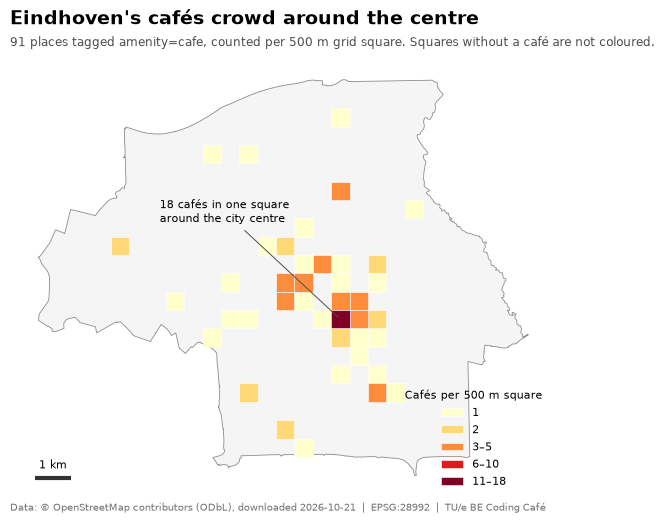
Typography and layout
One typeface, two or three sizes. Bold for the title, regular for everything else, small and grey for the credits.
Left-align the title with the map. Centred titles float.
Leave margins. A map that touches the edges of the image looks cramped when posted.
Square or 4:5 portrait crops best on social media; 16:9 for slides.
In matplotlib, plt.rcParams["font.family"] = "DejaVu Sans" (or any installed font) sets it
once for the whole script. In ggplot2, theme_void(base_family = "Helvetica").
Before you post
Run through this list. It catches nearly everything a reviewer, a supervisor or a stranger on the internet will point out.
The title says what the map shows, or what it means
The data is in a sensible projection (EPSG:28992 for the Netherlands), and areas or distances were computed after projecting
Every colour that encodes a value has a legend with units
Choropleths show rates or densities, unless all areas are the same size
The palette is sequential for ordered data, and works in greyscale
The credit line names every data source and its licence, including “© OpenStreetMap contributors” if you used OSM
Missing data looks different from zero
The image is exported at a known size (for example 1400 × 1400 px), with a white background
If an AI helped, the README has the one-line AI disclosure (see Maps with AI)
You looked at the exported PNG itself, at the size people will see it