The Earth is round and your screen is flat. A projection is the rule for flattening one onto the other, and every rule distorts something: area, shape, distance or direction. A coordinate reference system (CRS) is a projection plus the details needed to make coordinates unambiguous: the model of the Earth’s shape, the origin, the units.
You do not need the mathematics. You need to know three CRSs, how to check which one your data is in, and the two mistakes that cause almost every projection bug.
The three you will meet
| CRS | Name | Units | Use it for |
|---|---|---|---|
| EPSG:4326 | WGS 84, “lon/lat” | degrees | Storing and exchanging data. GPS, GeoJSON and most web APIs use it. Not for measuring or for a final map. |
| EPSG:28992 | Amersfoort / RD New | metres | Anything in the Netherlands: measuring, buffering, and the final map. All Dutch government data (PDOK, CBS, Kadaster) is published in it. |
| EPSG:3857 | Web Mercator | “metres” | Web map tiles (OpenStreetMap, Google Maps). Fine for looking, wrong for measuring: at Eindhoven’s latitude its distances are about 60 % too long. |
An EPSG code is just a catalogue number for a CRS. You can look any of them up at https://epsg.io.
Checking and converting
The CRS is stored with the data. Always print it after reading a file: it is the one line that saves the most debugging time.
import geopandas as gpd
import matplotlib.pyplot as plt

boundary = gpd.read_file("data/eindhoven_boundary.geojson")
cafes = gpd.read_file("data/eindhoven_cafes.geojson")
boundary.crs
<Geographic 2D CRS: EPSG:4326>
Name: WGS 84
Axis Info [ellipsoidal]:
- Lat[north]: Geodetic latitude (degree)
- Lon[east]: Geodetic longitude (degree)
Area of Use:
- name: World.
- bounds: (-180.0, -90.0, 180.0, 90.0)
Datum: World Geodetic System 1984 ensemble
- Ellipsoid: WGS 84
- Prime Meridian: GreenwichThere are two different operations, and confusing them is the most common projection bug:
to_crs()(R:st_transform()) converts the coordinates into another CRS. The numbers change, the places stay where they are. This is what you almost always want.set_crs()(R:st_set_crs()) labels data whose CRS is missing. The numbers stay the same. Use it only when you know what the numbers already are, for example a CSV of RD coordinates you have just turned into points.
rd = boundary.to_crs(28992)
print("lon/lat:", boundary.total_bounds.round(3))
print("RD New: ", rd.total_bounds.round(0))
lon/lat: [ 5.357 51.4 5.549 51.497]
RD New: [152881. 378995. 166241. 389787.]
RD coordinates are metres from an origin in northern France, chosen so every point in the Netherlands has positive x and y, and x is always smaller than y. If you see x around 160 000 and y around 380 000, you are looking at Eindhoven in RD New.
What goes wrong in degrees
The map is squashed
A degree of longitude gets shorter as you move away from the equator. At 51.4° N it is only about 62 % of a degree of latitude. Plot lon/lat as if both were the same length and the map is stretched east–west.
fig, axes = plt.subplots(1, 2, figsize=(10, 4.5))

boundary.plot(ax=axes[0], facecolor="#cfe0ef", edgecolor="#1f4e79")
axes[0].set_aspect(1)   # treat a degree as a degree, which is what naive plotting does
axes[0].set_title("EPSG:4326, plotted naively")

rd.plot(ax=axes[1], facecolor="#cfe0ef", edgecolor="#1f4e79")
axes[1].set_title("EPSG:28992")

for ax in axes:
    ax.tick_params(labelsize=7)
plt.show()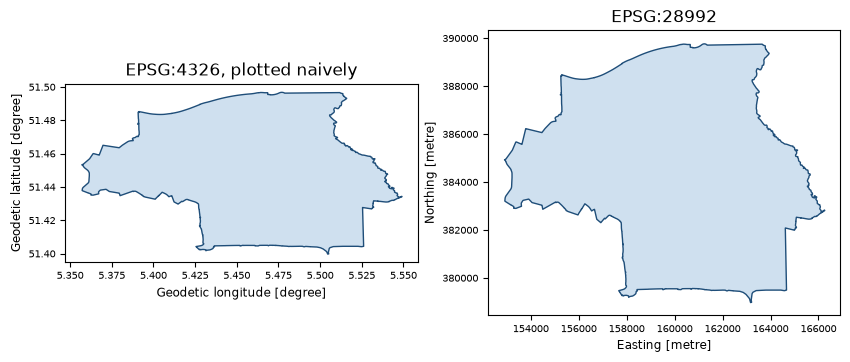
GeoPandas and sf correct the aspect ratio for lon/lat data when they know the CRS, so you will
mostly see this in other plotting tools, in data with a missing CRS, and in maps made by AI
assistants that build the plot from raw columns.
Distances and areas are meaningless
This one gives no visual warning at all.
print("Area in EPSG:4326:", boundary.area.iloc[0].round(4), "square degrees")
print("Area in EPSG:28992:", (rd.area.iloc[0] / 1e6).round(1), "km²")
Area in EPSG:4326: 0.0116 square degrees
Area in EPSG:28992: 89.4 km²
GeoPandas warns about this. Many tools do not. The same goes for buffers: a “buffer of 0.01” in lon/lat reaches 1.1 km north and south but only 0.7 km east and west.
centre = gpd.GeoSeries.from_xy([5.4793], [51.4430], crs=4326)

wrong = centre.buffer(0.01).to_crs(28992)          # buffer in degrees, then project
right = centre.to_crs(28992).buffer(1000)          # project, then buffer in metres

fig, ax = plt.subplots(figsize=(4.5, 4.5))
right.plot(ax=ax, facecolor="none", edgecolor="#1f4e79", linewidth=2, label="1000 m")
wrong.plot(ax=ax, facecolor="none", edgecolor="#c8102e", linewidth=2, linestyle="--")
ax.set_title("Blue: 1 km, buffered in RD New\nRed dashed: 0.01°, buffered in lon/lat",
             loc="left", fontsize=9)
ax.set_axis_off()
plt.show()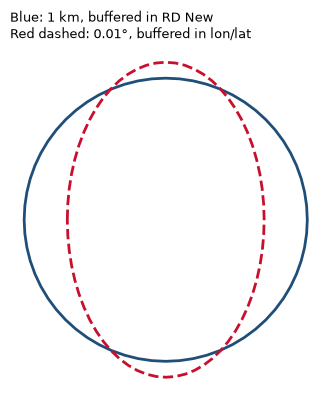
The rule is always the same: project first, then measure.
Lat/lon swapped
GeoJSON, shapely, GeoPandas and sf all use (x, y), which means (longitude, latitude). People,
Google Maps and many spreadsheets write (latitude, longitude). Swap them and Eindhoven (5.48° E,
51.44° N) lands in the Indian Ocean off Somalia (51.44° E, 5.48° N). If your points end up in the
sea near the equator, this is why.
Making points from a table
A CSV with coordinates is not spatial data until you say which columns hold x and y and which CRS the numbers are in.
import pandas as pd

df = pd.read_csv("sensors.csv")                      # columns: id, lon, lat, value
pts = gpd.GeoDataFrame(df, geometry=gpd.points_from_xy(df["lon"], df["lat"]), crs=4326)
pts = pts.to_crs(28992)
If the columns are already RD coordinates (x, y in metres), pass crs=28992 and skip the
to_crs.
library(sf)

df  <- read.csv("sensors.csv")
pts <- st_as_sf(df, coords = c("lon", "lat"), crs = 4326) |> st_transform(28992)
coords takes x first: c("lon", "lat"), not c("lat", "lon").
Projections for the rest of the world
Outside the Netherlands, pick the projection by what the map has to get right:
| The map must | Choose | Examples |
|---|---|---|
| compare areas (choropleths, density) | equal-area | Equal Earth (EPSG:8857) for the world; LAEA Europe (EPSG:3035) for Europe |
| show local shapes and distances | conformal, local | the national grid (RD New, British National Grid, Lambert 93), or the right UTM zone |
| look familiar on the web | Web Mercator (EPSG:3857) | tiled basemaps. Never for comparing areas. |
For a world map, Equal Earth is a good default. For Europe, EPSG:3035 is what Eurostat uses.
Seeing the distortion
The classic way to see what a projection does is to draw identical circles on the globe, 2000 km across each, and project them. Where the circles grow, the projection exaggerates area. Where they flatten, it distorts shape. This needs no data at all, so it is a good start for Day 22, Projections.
import numpy as np
from pyproj import Geod
from shapely.geometry import LineString, Polygon

geod = Geod(ellps="WGS84")

def circle(lon, lat, radius_m=1_000_000, n=72):
    lons, lats, _ = geod.fwd([lon] * n, [lat] * n, np.linspace(0, 360, n), [radius_m] * n)
    return Polygon(zip(lons, lats))

circles = gpd.GeoSeries(
    [circle(lon, lat) for lon in range(-150, 181, 60) for lat in range(-60, 61, 30)], crs=4326
)
graticule = gpd.GeoSeries(
    [LineString([(lon, lat) for lat in np.linspace(-80, 80, 50)]) for lon in range(-180, 181, 30)]
    + [LineString([(lon, lat) for lon in np.linspace(-180, 180, 100)]) for lat in range(-60, 61, 30)],
    crs=4326,
)

views = {"Plate carrée (EPSG:4326)": 4326, "Web Mercator (EPSG:3857)": 3857,
         "Equal Earth (EPSG:8857)": 8857}
fig, axes = plt.subplots(1, 3, figsize=(13, 4.2))
for ax, (name, epsg) in zip(axes, views.items()):
    graticule.to_crs(epsg).plot(ax=ax, color="0.8", linewidth=0.5)
    circles.to_crs(epsg).plot(ax=ax, facecolor="#c8102e", alpha=0.6, edgecolor="none")
    ax.set_title(name, fontsize=10)
    ax.set_axis_off()
plt.show()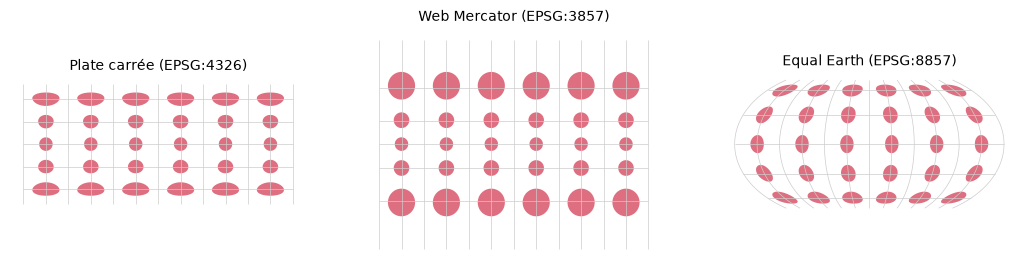
In Web Mercator the circles at 60° are four times the area of those at the equator, which is why Greenland looks the size of Africa. Equal Earth keeps every circle the same area, at the price of squashing their shape near the edges. No flat map can keep both.
library(sf)

world <- rnaturalearth::ne_countries(returnclass = "sf")   # install.packages("rnaturalearth")
plot(st_geometry(st_transform(world, "EPSG:8857")))        # Equal Earth
plot(st_geometry(st_transform(world, "+proj=ortho +lat_0=51.4 +lon_0=5.5")))   # a globe over Eindhoven
Any PROJ string works in st_transform, which makes it easy to try unusual projections for
Day 22.