Vector data describes the world as shapes with coordinates: a café is a point, a street is a line, a municipality is a polygon. Each shape is a row in a table, so everything you know about filtering and grouping tables still applies. On top of that you get a small set of spatial operations, and a surprising share of real maps are built from just six of them.
import geopandas as gpd
import matplotlib.pyplot as plt

cafes = gpd.read_file("data/eindhoven_cafes.geojson").to_crs(28992)
boundary = gpd.read_file("data/eindhoven_boundary.geojson").to_crs(28992)
Everything on this page is in EPSG:28992, so all distances and areas are in metres. If you skip
the .to_crs(28992), every number below is wrong without any error. See
Projections.
The three geometry types
| Type | Is | In Eindhoven | Challenge days |
|---|---|---|---|
| Point | one location, no size | a café, a tree, a lamp post | 1 Points, 4 Clusters |
| LineString | a path through several points | a road, a river, a bus route | 2 Lines, 24 Network |
| Polygon | a closed ring, with an area | a building, a park, a neighbourhood | 3 Polygons, 20 Hexagons |
Each has a “multi” version (MultiPoint, MultiLineString, MultiPolygon) for one feature made of several pieces, such as a municipality with islands. You can move between them: the boundary of a polygon is a line, the centre of a polygon is a point, and a buffer around a point is a polygon.
fig, axes = plt.subplots(1, 3, figsize=(10, 3.6))

cafes.plot(ax=axes[0], color="#c8102e", markersize=6)
axes[0].set_title("Points: cafés")

boundary.boundary.plot(ax=axes[1], color="#1f4e79", linewidth=1)
axes[1].set_title("Line: the boundary's outline")

boundary.plot(ax=axes[2], facecolor="#cfe0ef", edgecolor="#1f4e79")
axes[2].set_title("Polygon: the municipality")

for ax in axes:
    ax.set_axis_off()
plt.show()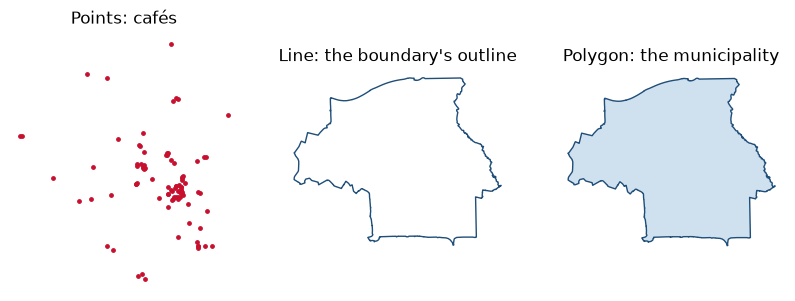
Attributes are just columns
Filtering by attribute is ordinary table work. In Python that is pandas; in R it is dplyr or base R, and the geometry comes along for the ride.
coffee_shops = cafes[cafes["cuisine"].str.contains("coffee", na=False)]
step_free = cafes[cafes["wheelchair"] == "yes"]

print(len(coffee_shops), "tagged as coffee shops,", len(step_free), "tagged wheelchair=yes")
16 tagged as coffee shops, 9 tagged wheelchair=yes
library(sf); library(dplyr)

coffee_shops <- cafes |> filter(grepl("coffee", cuisine))
step_free    <- cafes |> filter(wheelchair == "yes")
Six operations behind most maps
1. Measure: distance, length, area
station = gpd.GeoSeries.from_xy([5.4793], [51.4430], crs=4326).to_crs(28992).iloc[0]

cafes["dist_station_m"] = cafes.distance(station).round()
cafes.nsmallest(5, "dist_station_m")[["name", "dist_station_m"]]The station point was typed in by hand from a map, in lon/lat, and then reprojected like
everything else. from_xy takes x first, so longitude first.
2. Buffer: everything within a distance
A buffer turns a geometry into the polygon of all places within a given distance of it.
walk = gpd.GeoSeries([station.buffer(800)], crs=28992)   # roughly a 10-minute walk
near = cafes[cafes.within(walk.iloc[0])]

fig, ax = plt.subplots(figsize=(6, 6))
boundary.plot(ax=ax, facecolor="0.95", edgecolor="0.6")
walk.plot(ax=ax, facecolor="#f4c7cd", edgecolor="#c8102e", linestyle="--")
cafes.plot(ax=ax, color="0.6", markersize=6)
near.plot(ax=ax, color="#c8102e", markersize=14)
ax.set_axis_off()
ax.set_title(f"{len(near)} of {len(cafes)} cafés are within 800 m of the station", loc="left")
plt.show()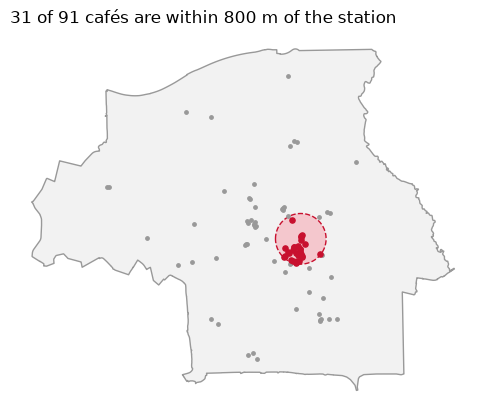
A straight-line buffer is a rough stand-in for walking distance, because people walk along
streets. For real travel distance you need a street network (Day 24, Network): see
Finding data for osmnx.
3. Spatial join: attach attributes by location
A spatial join is the spatial version of a table join: instead of matching on an ID, it matches on where things are. “Which neighbourhood is each café in?” is a spatial join of points to polygons. Here we make our own polygons, four quadrants around the city centre, to show the idea without downloading anything.
from shapely.geometry import box

x0, y0, x1, y1 = boundary.total_bounds
cx, cy = station.x, station.y
quadrants = gpd.GeoDataFrame(
    {"quadrant": ["north-west", "north-east", "south-west", "south-east"]},
    geometry=[box(x0, cy, cx, y1), box(cx, cy, x1, y1), box(x0, y0, cx, cy), box(cx, y0, x1, cy)],
    crs=28992,
)

joined = gpd.sjoin(cafes, quadrants, predicate="within")
joined["quadrant"].value_counts()
quadrant
south-west 39
north-west 29
south-east 16
north-east 7
Name: count, dtype: int64With real neighbourhood polygons (CBS wijken en buurten, from PDOK), exactly the same line gives you cafés per neighbourhood, which you can then divide by population or area.
4. Dissolve: merge shapes by a column
dissolve is groupby for geometry: it merges all shapes that share a value into one.
clipped = gpd.overlay(quadrants, boundary[["geometry"]], how="intersection")
halves = clipped.assign(half=clipped["quadrant"].str.split("-").str[0]).dissolve(by="half")
halves.area / 1e6   # km² north and south of the station
half
north 54.263575
south 35.099284
dtype: float64overlay with how="intersection" cut the quadrants to the municipal boundary first, so the
areas are real land area.
5. Convex hull and clusters
A convex hull is the smallest convex polygon around a set of points: a quick way to draw “the area this group covers”. Combined with a simple clustering of the points, it gives a Day 4 Clusters map. Here, cafés closer than 250 m to each other are chained into the same cluster.
groups = cafes.buffer(125).union_all()      # overlapping 125 m circles merge
blobs = gpd.GeoDataFrame(geometry=list(getattr(groups, "geoms", [groups])), crs=28992)
cafes["cluster"] = gpd.sjoin(cafes, blobs, predicate="within")["index_right"]

sizes = cafes["cluster"].value_counts()
big = sizes[sizes >= 4].index
hulls = cafes[cafes["cluster"].isin(big)].dissolve(by="cluster").convex_hull

fig, ax = plt.subplots(figsize=(6, 6))
boundary.plot(ax=ax, facecolor="0.95", edgecolor="0.6")
hulls.buffer(60).plot(ax=ax, facecolor="#f4c7cd", edgecolor="#c8102e")
cafes.plot(ax=ax, color="0.3", markersize=5)
ax.set_axis_off()
ax.set_title(f"{len(big)} clusters of four or more cafés", loc="left")
plt.show()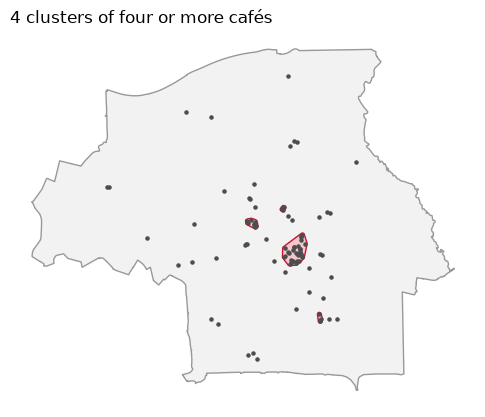
This is a hand-made version of single-linkage clustering. For anything you will report, use a
proper method such as DBSCAN (sklearn.cluster.DBSCAN in Python, dbscan in R) and say which
distance you chose: the clusters depend entirely on it.
6. Nearest neighbour: lines from points
Lines do not have to come from a dataset. Connecting each café to its nearest neighbour makes a Day 2 Lines map out of point data, and the line lengths say something real about how spread out the city’s cafés are.
from shapely.geometry import LineString

nearest = gpd.sjoin_nearest(cafes, cafes, exclusive=True, distance_col="gap_m")
links = gpd.GeoDataFrame(
    {"gap_m": nearest["gap_m"].values},
    geometry=[LineString([a, cafes.geometry.loc[b]])
              for a, b in zip(nearest.geometry, nearest["index_right"])],
    crs=28992,
)

fig, ax = plt.subplots(figsize=(6, 6))
boundary.plot(ax=ax, facecolor="0.95", edgecolor="0.6")
links.plot(ax=ax, column="gap_m", cmap="viridis", vmin=0, vmax=links["gap_m"].max() * 1.25,
           linewidth=1.8, legend=True, legend_kwds={"label": "metres", "shrink": 0.6})
cafes.plot(ax=ax, color="0.2", markersize=4)
ax.set_axis_off()
ax.set_title(f"Median distance to the nearest café: {links['gap_m'].median():.0f} m", loc="left")
plt.show()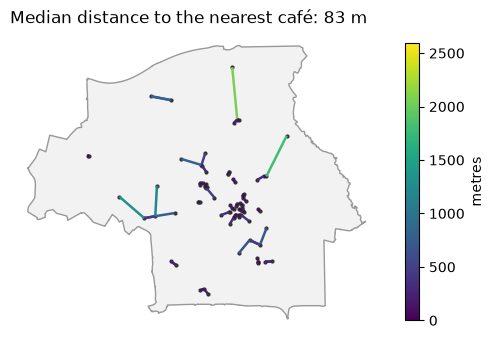
exclusive=True stops each café being matched with itself. Colouring the lines by length makes
the isolated cafés on the edges stand out. Setting vmax a little above the longest line keeps
the palette away from its palest yellow, which would vanish against the grey background.
st_distance(cafes, station)                         # 1. measure
st_buffer(station, 800)                             # 2. buffer
st_join(cafes, quadrants, join = st_within)         # 3. spatial join
quadrants |> group_by(half) |> summarise()          # 4. dissolve
st_convex_hull(st_union(cluster_points))            # 5. convex hull
st_nearest_feature(cafes)                           # 6. nearest neighbour (index)
st_nearest_points(cafes, cafes[nn, ], pairwise = TRUE)   # ... and the lines
In sf, summarise() on a grouped data frame dissolves the geometry, so the dplyr habits carry
straight over.
Valid geometry
Real data contains broken shapes: polygons that cross themselves, rings that are not closed.
Operations on them fail with errors such as TopologyException, or quietly give the wrong answer.
gdf = gdf[~gdf.is_empty]
gdf["geometry"] = gdf.make_valid()          # R: st_make_valid(gdf)
Run this once after reading data from anywhere you do not control, before overlays and joins.